
In my online work, I spend a lot of time examining what people are searching for on the Internet. I’m not the only one. We’ve always been into Google search here at MUO. We’ve offered everything from a cheat sheet of Google search shortcuts and tips, and help with getting search results for your site to look the way you want them to.
We’ve also closely watched the value of search results as Google has continually attempted to upgrade its algorithm. In 2012, Yaara felt that search results were much cleaner, while Justin offered up tips on how to extract links out of search results without all of the garbage in the URL string. There’s a lot about Google search results we like, and there’s a lot we still don’t like.
In fact, this year alone there have been multiple updates to the Google algorithm, code named “Panda” and “Penguin”. Cute names, but there’s nothing cute about the updates. Panda is all about ending the rule of content mills over the Internet, and Panda 1.0 did that in a big way in 2011. Penguin on the other hand, includes algorithm changes that were meant to specifically attack the old black hat SEO techniques - things like creating keyword stuffing links, low quality articles unrelated to the core site theme, and using exact match domains.
At this point, there have been over 25 Panda updates, with the latest reportedly occurring on July 18th. Some great websites we all know and love have suffered traffic loss, but at the same time, so have numerous content mills we’ve all grown to dislike. However, have all of these updates done the trick? Are Google search results as high quality as they should be after so many algo tweaks? In this article, I’m going to take a close look at the results of three common search queries and see just how quality the results really are.
If you have a family, then you know that there are always those weekends that arrive where you haven’t made any plans at all. It’s probably one of the most common things for a family to turn to Google for some ideas of fun things to do. How good is Google’s search advice?
The good news is that the top 4 listings were top-quality sites you would expect to see, like Real Simple with a list of “11 fun things to do on a rainy day”, or The Simple Dollar with “100 things to do during a money free weekend”. They are well written articles that are well-organized and contain thoughtful and valuable ideas. There were a few misses on the first 10 listings though, in my opinion. For example, “50 Fun Things to Do in an Elevator” on Meyerweb.

Nothing against Eric Meyer mind you. I mean, he’s well known in the web-design industry as a leader for web standards and CSS in particular. However, this particular page just contained nothing at all except 50 lines of ridiculous ideas like “make race car noises when anyone gets on or off”, or “One word: flatulence!”
Funny in a Ren and Stimpy kind of way, but is it honestly useful and valuable enough to be listed 6th in Google results for “fun things to do”? The only thing the page has going for it is that the title had “Fun Things to Do” in the left-most position, as did the first sentence on the page. But wait, I though the new algorithm updates eradicated the ability for non-valuable pages to rank highly based on a few little page tweaks? Maybe not.
Even worse, the guy that registered “randomthingstodo.com” lists 5th, proving that the domain itself still holds a lot of power in the search algorithm. The site itself is a never ending crowdsourced list of things to do – most of which are completely useless comments like “Go to Petsmart and buy bird seed. Then ask the clerk how long it will take the birds to grow.” Subract 1 from the Google algorithm score.
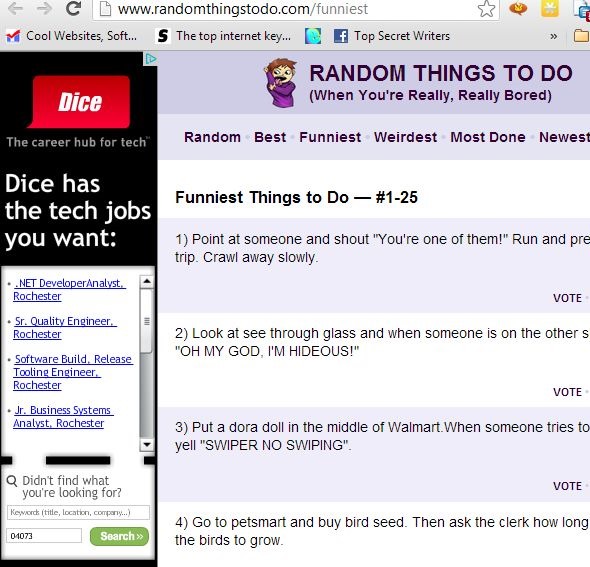
Meanwhile, the poor family that’s trying to find fun things to do, is left spending most of Saturday morning and afternoon sifting through useless, rambling Google results. On the upside, in later search listings, it does appear that the majority of results for this query are focused on local websites in different areas that happen to list fun things to do in that region. Score 1 for Google’s algorithm.

The majority of the highly-ranked sites were actually region-focused, which is interesting. It also appears that many of the top listings featured videos or slideshows, proving that it’s true that Google tends to value sites with more multimedia content as more valuable than sites that are text-only. This is usually a pretty safe assumption, most of the time. However, it also allowed a site that generally doesn’t write about topics like this — Bankrate.com, a financial website — to rank highly for this search phrase, because it offers a 10 page slideshow on the topic.

Conclusion for this search test – the bored family is going to struggle to find something to do, unless they log into their Google account so that Google can return region-specific search results based on the user’s actual location. Otherwise, they’ll be searching through useless listings for a long time.
Another topic that was notorious for content-mills to focus on are those evergreen “how-to” topics that people are always searching for online. How to fix a leaky faucet. How to install a bath tub. Things like that. To test if things have improved over the last couple of years in this regard, I tried searching for something simple – “How to fix a flat tire”.
My thought here was that it would be nice to see the top 10-20 listings as highly-detailed articles or photographic how-to guides showing how you can take a flat tire off a car, locate the hole in the tire, patch it up yourself, and then re-install. Unfortunately, what I found was that many content-mills still rule the day in the area of how-to topics like this.
In fact, WikiHow ranks first, probably because it has the ideal domain for how-to content, however the article that made it into first place for this search was completely useless.

It offered one stock photo near the intro, listed text-only instructions, and those instructions were basically how to install a purchased kit. The first step is “read the directions on the can of sealant you have brought.” Horrid writing aside, why would a person even bother reading this article if they have a product with directions in front of them? The whole list was clearly written in haste, and only to attract search engine traffic to the site. Little to no value at all.
Fix-a-Flat ranks highly, as well as other sites that show how to use the Fix-a-Flat product. There’s one article from Instructables.com, a site that usually offers pretty good info. However, in this case it made me page through 10 pages (nice trick to bump up pageviews), only to discover the article wasn’t about “fixing” a flat, but about “changing” a flat.
Then there’s eHow, the content-mill we all know and love, listing 8th in the search listings.

As usually, Ehow just offers a stock image near the intro, and then 16 steps of text-only instructions meant to make a certain word count, with stupid steps like, “Apply the hand brake and put the transmission in park or in gear so the car won’t roll.” Gee…thanks for warning me, or I would have parked my car and left it in Drive. Seriously? Google considers this to be worthy of 8th place on the first page of results?
Paging further down in Google Listings to try to find the actual useful articles on fixing flat tires, I spot Huffington Post. So, now Huffington is an authority on fixing flat tires? Well, not quite. Huffington posted a video titled “How to Fix a Flat Tire in Seven Minutes, From Lauren Fix”. What was this amazing fix? Nothing more than using a Fix-a-Flat kit to get a flat tire rolling again.

It’s basically a one-and-a-half minute ad for Fix-A-Flat, and apparently Google feels this belongs up on page 3 of its listings. Where did I finally learn how to fix a flat tire? Well, it was an embedded video on the blog HandyManFixHome.com. This was an 8 minute video that provided every detailed step, including all of the tools needed, to actually fully patch a flat tire using actual tools (not just a Fix-A-Flat spray).
Where was this useful result listed in Google’s search listing? Page 19. It took me half an hour sifting through Fix-A-Flat ads and content-mill articles to finally find the useful blog and its embedded video, where the expert advised, “don’t rely on Fix-a-Flat, which is unreliable for large punctures”.
So far, my test searches have been very generic. For the next text, I decided to focus on a very fringe topic that few people would be covering, to see how well Google can turn up valuable results for even smaller niches like this.
Instructables and Mother Earth News actually had useful info on how to build a crossbow. Of course, there are the obligatory YouTube videos, now that Google owns YouTube…
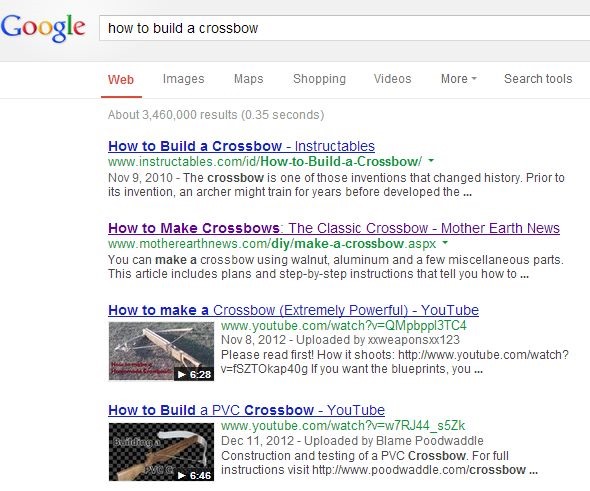
I was disgusted to see WikiHow once again in the top listings – both number 5 and 6. However, taking a look at these articles, they were clearly written with a lot of effort and detail, and are definitely worthy of a high listing.
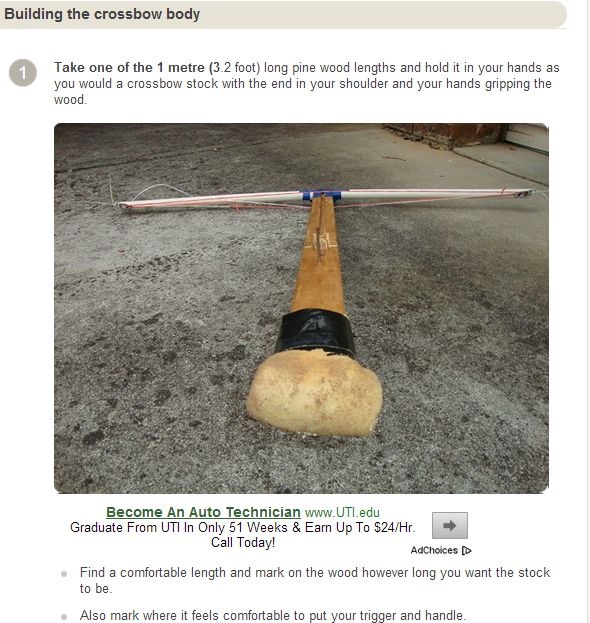
The instructions had great detail and high-quality images with almost every step. Score +1 for the Google algorithm on that one. Unfortunately, there was one listing on the first page of Google search results that was obviously only there because the owner of the site had landed an exact domain for the search, MakeCrossbows.com.

The site has hardly any useful content, very little information inside of the articles, and it’s obviously only there to collect traffic from a semi-popular search term, and the Google algorithm hasn’t been able to recognize the site for the low-quality, traffic-collection tool that it is. Subtract another point from the Google algorithm.
And then there’s the Squidoo site listed on page two of Google results. Page two!

It’s an extremely amateur-designed site with randomly tossed-on information about crossbows, a bunch of links and videos to external sites about crossbows, and a comment area. Where Google sees the value in this site, I have no idea – but there it is.
I was personally excited to see the first few Panda updates, and the demise of content mills. It was exciting to think that online writers that are diligently working long hours to provide interesting and useful content on the web would finally be rewarded by getting listed higher in Google search results than all of these amateur or mediocre sites with horrid writing that have been gaming the Google search engine for years. However, even after 25 updates, Google still seems to have succeeded at nothing more than hurting the ranking of sites with fantastic and useful content because they are newer, while pushing results of older domains higher in search results regardless of quality or actual value.
That is what I believe the findings above reveal, but I’d love to hear your analysis of these listings and the current state of Google’s search algorithm. Have the recent updates hurt or helped your site? Do you like the direction that Google is headed with each update? Share your input and insights in the comments section below.


![Don’t Get Suckered By The Facebook Graphic App Hoax [Weekly Facebook Tips]](https://blogger.googleusercontent.com/img/b/R29vZ2xl/AVvXsEipjG5elDXxDotJMKX3eu0S2Oa0F6NKoM436vtoRKZd_AWxdLY1ZNepIGZPdKE7Oq8vHg7NEuP71Vcc3bfWkaPoeD6GnqRx27hy3Mb_k-4u3JN6BOXFIGLRAbCONn4ENnynWnIQgFbyNkA/s72-c/?imgmax=800)
![How Can I Override Silent Mode With a Text Message? [Android]](https://blogger.googleusercontent.com/img/b/R29vZ2xl/AVvXsEh3tfD7w1lMR8IF3HVhYv5qhnhUlu1kGpJ2XpSLZQUjMmu0Cyd9e1wWVMs4UZ6fgD0NGkXfz5xAAIIsKWh-dVmiNtvg8Nbk4xnruYtU3Hh_lFwkpwHem1XfI6JEilJ-b2sDN5kLVr7dhLM/s72-c/?imgmax=800)


![Sick Of Facebook? Set Your Account To Read-Only Mode [Weekly Facebook Tips]](https://blogger.googleusercontent.com/img/b/R29vZ2xl/AVvXsEh9JLuwO90HtxKDCdZ5yWE0TONnYrDo-ToBLIm3P-Q1AmkVZPYXOVfEAQVGjCZw1_8zXodaUEC3mxgl_skc-FC5htUqiC0CTDftTvTYylwn5MgTyEXhkQN2eg9i2ex0_af07Kxw0p5X8Hg/s72-c/?imgmax=800)


Follow Us
Were this world an endless plain, and by sailing eastward we could for ever reach new distances